One of the aspects of home computers like the C64 or the Amiga 500 that made them so interesting to me - well behind gaming of course - was that those machines were something one could know well.
It was possible to know those things well enough to use, to program, to take apart, to fix, and to modify them.
In a word, one could “master” those machines.
Obviously, some people could do that better than others - I still think that demos like the Spaceballs - State of the Art or the Alcatraz - Odyssey are an absolute marvel on an Amiga 500.
The computers I use today are vastly more capable and horrendously more complicated. A “mastery” of those systems to the same extend one could have over home computers is out of reach for most people, myself included. And this does not only apply to computers that are recognisable as such but to all sorts of modern consumer electronics.
With this background I am particularly happy about three small wins I made recently. Here they are:
- Recover data from an unmountable Apple SSD drive
- Get a faulty Kärcher Window Vacuum working again
- Replace a blocked solenoid valve in a Breville Espresso machine
Recover data from an unmountable Apple SSD drive #
An external SSD drive suddenly did not mount on macOS anymore.
Running the Disk Utility First Aid function did not fix the issue but only provided very detailed and incomprehensible details on why it failed:
Running First Aid on "extssd" (disk5s1)
Checking file system and repairing if necessary and if possible.
Volume is already unmounted.
Performing fsck_apfs -y -x /dev/rdisk5s1
Checking the container superblock.
Checking the checkpoint with transaction ID 4454.
Checking the space manager.
warning: spaceman chunk 111 free count 1048552 > block count 32768
error: spaceman cib out of order: 0, expected 20
Space manager is invalid.
The volume /dev/rdisk5s1 with UUID
00000000-0000-0000-0000-000000000000 could not be verified
File system check exit code is 8.
Restoring the original state found as unmounted.
File system verify or repair failed.: (-69845)
Operation failed...
I write “incomprehensible” because there is no documentation for these error messages available to the technically inclined macOS user.
What did I try to get access to the data again?
One of the first ideas I found was Mounting APFS file systems on Ubuntu 22.04. Maybe it would be possible to access the SSD on a different computer running Ubuntu Linux.
As I still have my trusty Skullbox from years back on my desk I went and installed the APFS filesystem driver apfs-fuse. Mounting the SSD this way worked and I was able to copy the content to another external hard drive, formatted with ExFAT.
While this approach saved the contents of the SSD copying the files from SSD to a HDD was very slow. And the change of filesystem (APFS to ExFAT) meant that permissions, file dates, and other metadata would be lost.
It led me to another idea though: mounting the SSD on macOS but as readonly. I found a matching forum entry: How to mount an external drive (APFS) as read only? and went to work:
diskutil list
# sudo diskutil mount readOnly -mountPoint <path> <device>
sudo mount_apfs -o rdonly /dev/disk1s1 /Volumes/Backup
Again, for reasons unclear to me this did not work - macOS would simply refuse to mount the SSD volume, even in readonly mode.
Nearly defeated I clicked around in the Disk Utility tool and discovered that I could right-click on the shadowed-out "Container diskX". In the context menu that opened there was the option to Image from "Container diskX".
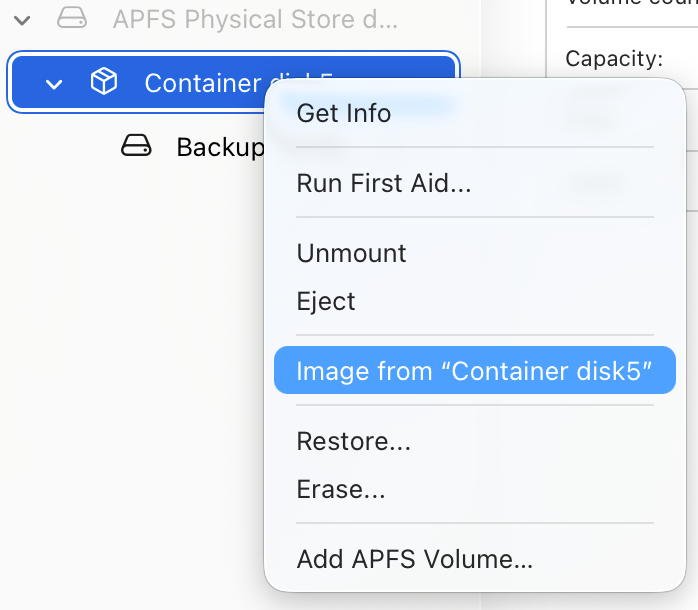
Picking this option I chose Read-only Image (URDO) (not compressed, no encryption) as the target image format and a target folder for the image file.
To my surprise, this image creation worked. About 20 minutes later a brand new read-only image had been created and could be opened in Finder without any trouble.
All the files and folders were there, including owners, dates, and metadata.
At this point I reformatted the failed SSD drive and copied over the contents once again. This time I used rsync to copy files and folders:
sudo rsync -ah --progress \
--ignore-existing --update \
--exclude ".fseventsd" \
--exclude ".Spotlight-V100" \
--exclude "TemporaryItems" \
--exclude ".DocumentRevisions-V100-bad-1" \
/Volumes/extssd\ 1/ /Volumes/extssd/
Note: I set those --exclude parameters to make sure macOS rebuilds those structures from scratch on the newly formatted volume.
Yet another surprise at this point was that the connection between the external USB-C SSD an the MacBook was very quick: 1 GB/s read and 500 MB/s write.
I cannot claim to fully understand what went wrong in the first place or what specifically allowed for creating an image while mounting the volume would not work - but in the end all data was there again. I’m taking that win.
Get a faulty Kärcher Window Vacuum working again #
So, I have this Kärcher WV5 Window Vacuum cleaner now for several years. I think it’s a neat product that generally works well and make the window and mirror cleaning a bit more enjoyable. (couldn’t really say that it makes it suck less, could I?).
The gizmo does not need maintenance beyond charging the battery and cleaning out the dirty water after use. Great stuff.
Until two weeks ago, when switching it on, the machine did nothing and the control light blinked red.
Something I’ve never seen on this machine and that the manual does not cover.
After some searching I found the product support page which told me:
Due to an ingress of moisture into the suction turbine, the turbine shaft may be stuck. Remove the cleaning head and spray two squirts of WD40 down into the body of the machine and leave overnight. Did this fix the problem?
This seemed to be very much in the “try and hope” corner of trouble shooting strategies. I looked at more search results and found that this appears to be a rather common issue with this product.
Two pages stood out to be the most helpful for my situation:
- Karcher WV5 Window Vac Switch Won’t Start, FIXED (Water / Corrosion on PCB)
- Inside a faulty Kärcher window vac.
Especially the latter one - a youTube video showing the disassembly process - helped me fixing my window vac.
After removing all screws and carefully removing the black plastic shell at the bottom end, I was able to open the inner construction and found the turbine was indeed stuck.
I applied WD40 as suggested, cleaned up where it went beyond the target area, and … it’s working again!
Reassembling was simply redoing the disassembly steps in reversed order.
In hindsight this was super-easy and the whole construction is surprisingly simple.
Replace a faulty solenoid valve in an Breville Espresso machine
I love my coffee at home. Years ago I got a Breville Oracle (BES980) as a birthday present and it has been in daily use since. With the occasional maintenance and repair interruption that is. What I have learned since is that espresso machines are an intricate setup of boilers, temperature-, water-level-, and pressure-sensors, gaskets and general electronics.
Having someone qualified doing the required maintenance and repairs is a great choice, since it usually means: the machine will predictably return in working order and the good coffee can continue to flow.
The downside is of course, that this is an re-occurring cost that I’d rather spend on coffee beans.
Earlier this year then I noticed that the “backflush” function of the machine started to sound “weird”. Eventually it completely stopped working and instead of getting excess water from the brew head into the water tray all the machine produced was a blocked up “plop” sound.
Queue again the trusty internet research and the now familiar finding: this problem is well known and has to do with a component called “solenoid valve” - if you already know what that is and how it works you are way ahead of me before I encountered this problem.
A particularly helpful resource for this was
How to Repair a Faulty Solenoid Valve on Breville Dual Boilers BES920 BES980 BES990 which covers the whole process of identifying the issue, getting replacement parts, putting the new parts into the machine etc.
After getting the ordered replacement part in the mail, I followed the instructions from the video and after roundabout 45 minutes the machine was working properly again.
And that’s it. These are the three small wins. Nothing spectacular at all. In fact, I think that this it should be normal again to be able to do these things - preferably without having to go onto a safari for some hidden how-to in the interwebs.
There is a whole movement for the right to repair which, to me, makes a lot of sense.
I am not very familiar with where Australia is on this topic, but pages like If you buy it, why can’t you fix it? Here’s why we still don’t have the ‘right to repair’ and How does your ‘right to repair’ work? indicate that there is still a long way to go until Australians indeed have a right to repair for the things they own.
It seems like the US have much more vocal advocates and organisations for this topic, e.g.
- Right to Repair explained in under 60 seconds - FTC rulemaking testimony from Louis Rossmann
- Steve Wozniak speaks on Right to Repair
- https://www.ifixit.com/
In any case, I’m happy that my stuff is working again and that I was able to do it myself.